Path Solver
NOTE: This topic is only applicable to the following Robotics OLP products:
- Visual Components Premium OLP
- Visual Components Professional OLP
- Visual Components Robotics OLP
Note: This tool is only available if the Robotics Solver Add-on is enabled.
Path Solver automatically resolves common robot motion path issues. These include collisions, singularities, joint limit violations, and reachability problems. Path Solver supports Process paths, Search paths and Via paths.
Path Solver can be found in the Hover panel.

For Path Solver to work, it first needs Collision Detectors to be active and set up correctly.
You can modify Solver settings in the Robot settings window, in the Solver tab
How to use Path Solver:
- Activate at least one collision detector. For more information, see Collision Detectors.
- Check the paths using the Path Check tool, see Path check.
- If there are problems found in the robot paths, open the Path Solver from the hover panel.
- Select which paths you want to solve, Process, Search or Via and select the correct tab from the solver window.
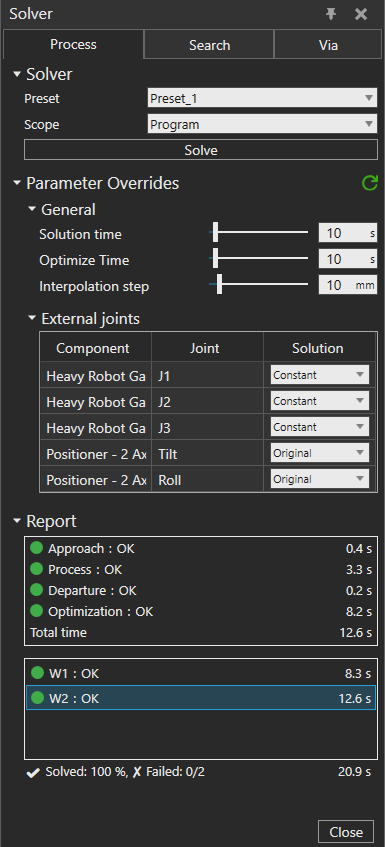
- Select the solver parameter preset you want to use and the scope of the program.
If you want, you can also override certain solver parameters. - Click Solve. The tool adjusts paths based on selected parameters
- After solving, the results can be seen in the Report section.